
iQuran – القران الكريم
Beehive Innovation FZEBooks & Reference
4.44.58K Reviews
- Version
- 2.7.5
- Installs
- 100.00K
- Age Rating
- Everyone
Screenshots

Our Review of iQuran – القران الكريم
 Analysis by Appyee
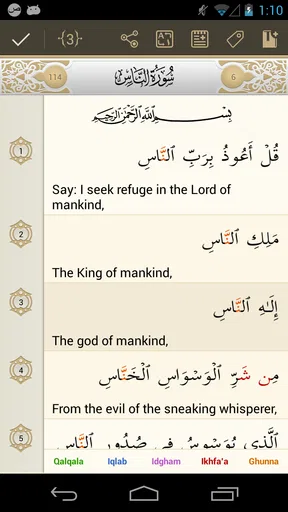
During the first week with iQuran – القران الكريم, what stands out is how quickly it can fit into a short reading routine. I can open the Arabic text, keep a translation alongside it, and use the color cues as a reminder to pay attention to Tajweed while reciting. That combination makes it more purposeful than a general-purpose reading app, especially when I want to spend a few quiet minutes with the Quran rather than browse through a large collection of material.
Why the first few sessions feel useful
The immediate appeal is not that the app tries to turn reading into a complicated project. Its central job is clear: help me read the Quran in Arabic while referring to a translation and noticing color-coded recitation guidance. For someone returning to regular reading, that is a practical starting point. I do not have to move between a printed Arabic text, a separate translation, and an unrelated Tajweed reference just to keep the basic reading session together.
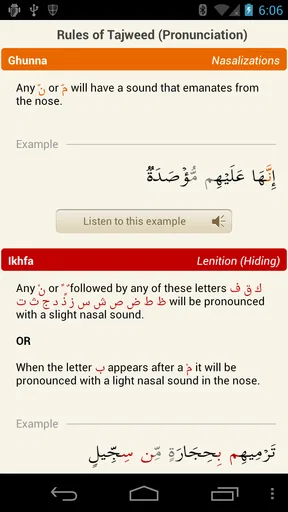
I would approach the colors as reading support, not as a substitute for learning proper pronunciation from a qualified teacher or a trusted recitation. That distinction matters most for beginners: visual cues can draw attention to rules, but they cannot listen to your recitation or correct a sound you have misunderstood. Used with that expectation, the feature can help me read more attentively without promising more than an on-screen guide can deliver.
A routine that can survive the novelty
After the initial curiosity wears off, the useful question is whether the app makes it easier to return the next day. A modest routine is where I see the best fit: read a short passage, check its translation, and mark a verse to revisit when I have more time. The point is not to treat every session as a full study lesson. A compact, repeatable habit is more realistic on busy days, and a Quran app is most valuable when opening it feels simple enough to do consistently.
For example, I might use a quiet moment before bed to read a few verses in Arabic, then look at the translation to confirm the broad meaning I took from them. If a passage catches my attention, a bookmark or note can help me return to it later instead of relying on memory. The next session then has a clear starting point. That workflow gives the reading tools a continuing purpose rather than making them features I explore once and forget.
There is also a useful trade-off between a quick reading session and a deeper study session. A translation can help me follow the sense of a passage, but it is not the same thing as a full commentary or scholarly explanation. If I am investigating a difficult question, I would use dedicated references and trusted scholarship alongside the app. For everyday reading and reflection, keeping Arabic and translation close together is more convenient than switching repeatedly between sources.
Features That Stand Out
First off, iQuran – القران الكريم isn't your average religious app. It's packed with a bunch of features that make it super user-friendly and engaging. The app offers a complete Quran in Arabic text with color-coded Tajweed rules, which is an absolute lifesaver for anyone trying to improve their recitation skills. The color coding helps you pronounce the words just right, making sure you don't miss any nuances.
Now, let's talk translations. The app offers multiple translations, and switching between them is a breeze. Whether you're comfortable reading in English, Urdu, or any other supported language, you’ll find an option that suits you. This feature makes it easier for users from different linguistic backgrounds to connect with the Quran in a meaningful way.
Audio Recitations
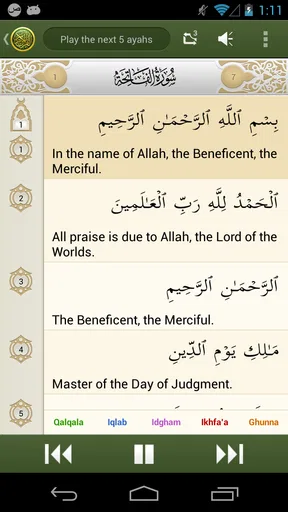
One of my favorite features has to be the audio recitations. You can listen to some of the most renowned Quranic reciters and follow along with the text. It's perfect for when you're commuting, relaxing at home, or even going for a walk. Just plug in your headphones and let the peaceful recitations soothe your soul. The app even allows you to download these recitations, so you can listen offline. This is a game-changer for those moments when you're off-grid but still crave that spiritual connection.
Audio is especially handy when I want to listen without staring at a screen, but the setting makes a difference. At home, following the text while listening can turn a passive moment into a focused one. On a walk or commute, I would treat the recording as listening time rather than trying to read while moving; attention and safety matter more than keeping my eyes on the screen. Downloading a recitation before leaving a reliable connection is a sensible step if I expect to listen offline.
User Interface and Experience
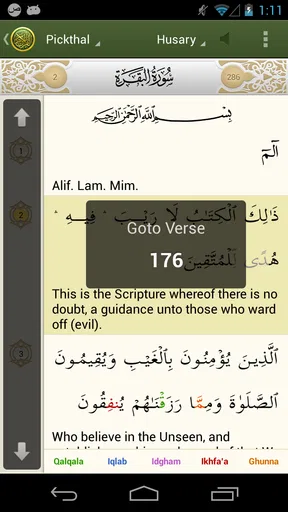
Let's be real, nobody likes an app that’s cluttered or hard to navigate, right? Well, the developers of iQuran – القران الكريم must have heard our collective prayers because they nailed the user interface. Everything is clean, minimal, and intuitive. Even if you’re not tech-savvy, you’ll find it easy to get around. The search feature is particularly useful, allowing you to find specific verses or topics in no time.
Search is most useful when I already have a clear starting point: a word, a phrase, or a passage I want to return to. It is less of a replacement for a guided study path, since finding a match does not by itself explain context or interpretation. One practical habit is to use search to locate a passage, read the surrounding verses as well, and then save the section if I intend to study it later. That reduces the risk of treating a single result as the whole subject.
Customization is another area where this app shines. You can adjust the font size and background theme to suit your preference. Whether you like reading in a dark mode to save your eyes during night hours or prefer a bright interface, the app has got you covered.
These adjustments are more than decoration if I read at different times of day. A comfortable font can reduce the temptation to rush through a passage because the text feels difficult to follow, while a suitable background can make a short evening session easier on the eyes. I would set the reading appearance once before settling into a routine, rather than repeatedly changing it mid-session and losing focus.
Bookmarking and Notes
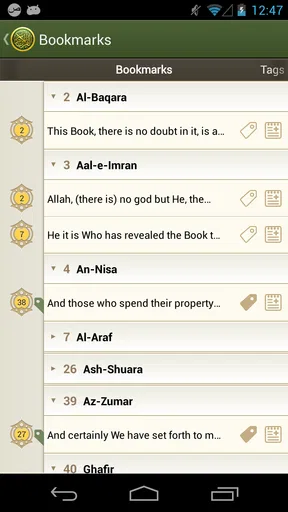
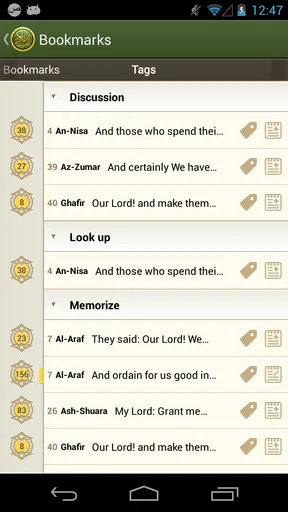
Ever wished you could jot down your thoughts while reading a verse? The app’s got a nifty notes feature that lets you do just that. You can bookmark your favorite verses and add personal notes to them. This is particularly useful for students or anyone who loves reflecting on the teachings of the Quran. You can revisit your notes anytime, making it easier to track your spiritual journey.
For a study workflow, I would keep notes brief and personal: a question to look up, a connection I noticed, or a reminder to ask a teacher. That makes a saved verse useful without turning a reading session into a long writing task. Bookmarks also work best when I use them selectively. If I mark everything, the list stops helping me find the passages I genuinely want to revisit.
How it fits beside other Quran resources
Compared with a printed mushaf, a phone offers portability, adjustable text, search, and a translation close at hand. A printed copy may be the better choice when I want to avoid screen distractions or prefer a familiar physical reading experience. Compared with a basic Quran reader, the appeal here is the combination of Arabic text, translation, color-coded Tajweed, audio, and personal reference tools. I would not assume that any one app replaces every other resource: a teacher is better for correcting recitation, and a dedicated study reference is better for detailed interpretation.
The app is most suitable for readers who value having those reading and reflection aids together and who are comfortable using a phone for devotional reading. It can also be useful for someone who understands Arabic but wants a translation nearby, or for a learner who wants visual prompts while practicing. It is less compelling for a person who only wants a plain text copy with no extra reading aids, who strongly prefers paper, or who needs structured lessons and direct feedback. In those cases, a simpler reader, a printed Quran, or guided instruction may serve better.
Keeping the app useful without adding friction
Because the app is designed around reading rather than a complicated study system, the maintenance burden can stay low. I would make a small number of choices that support my routine: select a comfortable text size, settle on a translation I can follow, and save only passages I expect to revisit. If I use audio away from home, downloading what I want beforehand avoids depending on a connection at the moment I plan to listen. These are simple preparations, but they prevent setup and searching from taking over the time I meant to spend reading.
There are still ordinary sources of fatigue. Reading on a phone can invite notifications and other distractions, and switching between Arabic, translation, and notes can become busy if I try to do everything at once. I find it more sustainable to choose one purpose for each session: recitation practice, listening, or reflective reading. That keeps the app from feeling like a checklist and makes its different tools easier to use when they are actually relevant.
As an app in the Books & Reference category, it is made by Beehive Innovation FZE. Its average rating is 4.4 from around 45,000 ratings, and it has over 100,000 installs, which suggests that many readers have found a reason to try it. It costs $1.99, is rated for Everyone, and version 2.7.5 supports Android 5.0 and later. I would weigh the price against how often I expect to use its combination of translation, Tajweed cues, audio, and personal reading tools; someone who needs only occasional access may prefer a free or physical alternative.
Why You Should Try It
All in all, iQuran – القران الكريم is more than just an app; it’s like a companion on your spiritual path. Whether you’re a beginner or someone who’s been on this journey for years, there’s something for everyone. The combination of translations, recitations, and user-friendly features makes it a versatile tool for anyone seeking to deepen their understanding of the Quran.
So, if you’re looking to enhance your spiritual life or just want a more convenient way to stay connected to the Quran, give this app a try. It’s like having a pocket-sized reminder of the teachings you hold dear, anytime you need it. Trust me, it’s worth the download!
My long-term verdict
What earns this app a lasting place is not novelty but the way its tools can support a steady practice: Arabic reading, a nearby translation, recitation guidance, listening, and a personal trail of saved passages. I would keep using it if those are things I return to week after week. I would not keep it merely because it has many options; a simpler resource is a better fit if the extra aids go unused or make screen reading feel distracting.
My recommendation is therefore specific rather than universal. If you want a portable Quran-reading companion and will make use of its translation and recitation support, the $1.99 cost is easier to justify as part of a routine. If your main need is expert feedback, extensive commentary, or uninterrupted reading away from a phone, pair it with a teacher or another reference, or choose a different format. Used for what it does well, it can make a small, meaningful reading habit easier to maintain.
Verdict
Strengths of iQuran – القران الكريم
- User-friendly interface and navigation.
- Comprehensive search functionality.
- Offline access to Quranic text.
- Audio recitations by multiple Qaris.
- Bookmark and note-taking features.
Limitations of iQuran – القران الكريم
- In-app purchases can be pricey.
- Limited language support.
- Occasional audio glitches.
- Ads in the free version.
- Large app size may affect storage.
Similar Picks in This Category
View All
Google Play Books & Audiobooks
Google LLC4.7

네이버 - NAVER
NAVER Corp.3.5

Wattpad - Read & Write Stories
Wattpad.com3.7

King James Bible - Verse+Audio
Ozion4.8

Bible Offline-KJV Holy Bible
Bíblia Offline4.9

Amazon Kindle: Reading App
Amazon Mobile LLC4.8
Frequently Asked Questions
What features does iQuran – القران الكريم offer for reading and learning the Quran?
iQuran – القران الكريم provides a comprehensive suite of features for reading and studying the Quran. It offers clear Arabic text, translations in multiple languages, and audio recitations by various renowned Qaris. Additionally, users can bookmark verses, access Tafsir for deeper understanding, and utilize the search function to find specific passages quickly.
Is iQuran – القران الكريم suitable for beginners who are new to the Quran?
Yes, iQuran – القران الكريم is designed to cater to users of all levels, including beginners. The app provides translations and transliterations, helping new readers understand and pronounce the Arabic text. The Tafsir feature offers explanations, making it easier for users to grasp the meanings and context of the verses.
Does iQuran – القران الكريم require an internet connection to function?
iQuran – القران الكريم primarily operates offline, which means users can access the Quranic text, translations, and many features without an internet connection. However, some features, such as downloading additional recitations or updates, may require internet access. This makes it convenient for users to read and study the Quran anywhere.
Are the audio recitations in iQuran – القران الكريم free to download?
iQuran – القران الكريم offers a selection of audio recitations that can be downloaded for free. Users can listen to different Qaris to enhance their recitation and memorization skills. While the app provides many free options, some additional recitations might be available for purchase or require a premium version of the app.
How does iQuran – القران الكريم handle updates and new features?
iQuran – القران الكريم is regularly updated to improve user experience and add new features. Users are encouraged to keep their app updated to benefit from the latest enhancements, bug fixes, and additional content. Updates can usually be downloaded directly from the app store, ensuring the app remains functional and secure.
